
Folder Marker
Free 4.1.0.0
Size: 4.34 MB
Downloads: 4509
Platform: Windows (All Versions)

Folder icons are interesting, for a brief period of time, only when you install a new Windows version for the first time. Changing a folder's icon is not hard, but changing the icons of multiple folders can be tedious. What's more, Windows does not offer any alternative icons, except for the ones that are already used by various applications or functions. If you are tired of the same icons, Folder Marker Pro will help you change them. The application is not designed just for fun. The various icons it places at your disposal allow you to manage your data in a more efficient manner.
Folder Marker is available in three versions: Pro, Home and Free. Although you don't have to pay anything for the free version, it does not contain as many features as the other versions. Regardless of which edition you choose, you will not wait for too long to download and install the application.
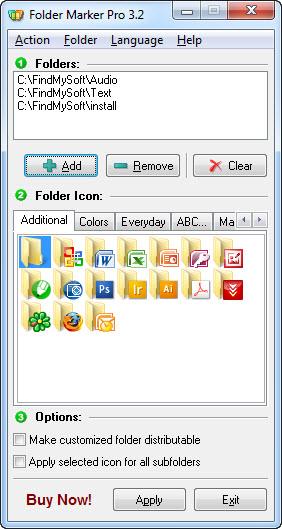
Folder Marker Pro's interface is compact and it makes it easy to change the icons of one or more folders. You can target a folder with the aid of a browsing option. Alternatively, you can select an option, from the Folder menu, which enables you to target multiple folders.
The application comes with its own icons library. The available icons are categorized on separate tabs. As previously stated, Folder Marker Pro focuses more on organizing data, so you should not expect to find icons that are shaped like cars, lightning bolts and so on. All icons are folder-shaped, but each of them includes a smaller icon, so you may select one, depending on the contained data. For example, if a folder contains MS Word documents, you can select a folder icon which includes a smaller Word icon.
It is also possible to change the colors of your folders. You can find a large number of differently colored folder icons on one of the interface's tabs. This makes it possible to color code your data. If you want to prevent someone from deleting a folder, you may color it red or browse for other icons that contain an exclamation mark or other symbols. Icons with letters and numbers are available as well, so you can also organize your files by name.
After selecting one or more folders and an icon, you only need to click the Apply button and the folder's icon will be changed instantly. Additionally, you may tick an option to make the customized folder distributable or another option to apply the selected icon to sub-folders as well. Another useful feature is the possibility of changing icons directly from Windows Explorer. Just right click a folder and select a new icon from a series of sub-menus.
Pros
The application provides a large number of icons. They make it possible to color code your files or organize them by importance, their native application, the first letter from their names and so on. The simplicity of the interface makes this task easy and straightforward.

Cons
The software's free version does not work on Windows 7. Folder Marker Pro places a large array of icons at your disposal, making it possible to organize your data as easy as possible, just by changing the icons of your folders.

Folder Marker
Free 4.1.0.0
Download
Folder Marker Awards

Folder Marker Editor’s Review Rating
Folder Marker has been reviewed by Frederick Barton on 06 Sep 2012. Based on the user interface, features and complexity, Findmysoft has rated Folder Marker 5 out of 5 stars, naming it Essential







